
Dual tech ceiling occupancy sensor
20 EA
2#12 lighting branch runs
1318 LF
1/8" = 1'-0"92%
Stop counting outlets on printed plans. AI-powered electrical estimating software that reads your drawings, traces every circuit, counts every device, and generates professional bids in hours instead of days.
Demo on your drawings • No credit card required
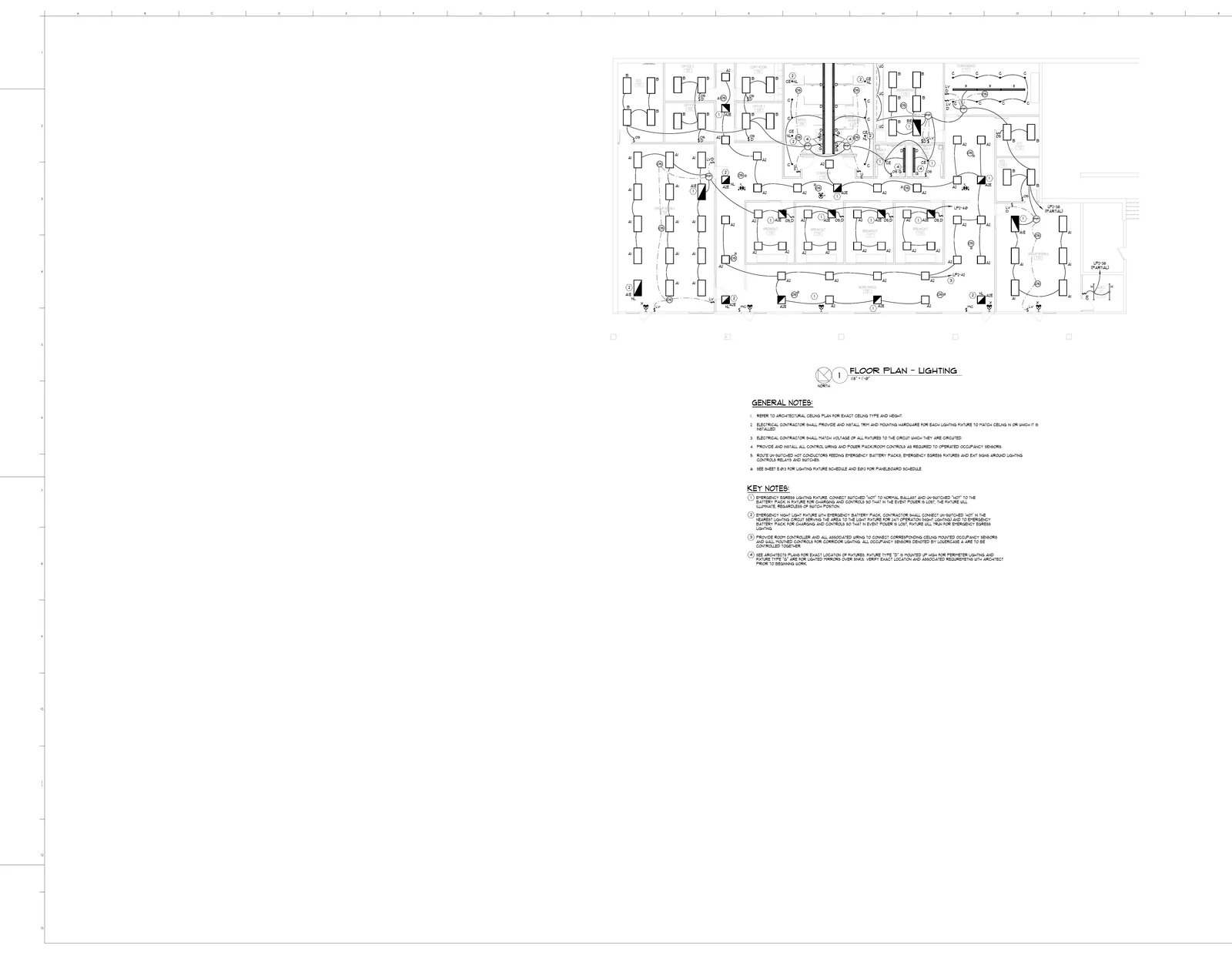
The actual BuildVision AI editor on an anonymized commercial E320 lighting plan: fixtures by type, switches and sensors, plus branch wiring and concealed conduit runs traced across the floor. Click any group or run to inspect it.
Fixture counts and wiring runs from the takeoff above become CSI 26 line items with waste factors, labor hours, and material costs — a bid-ready electrical estimate.
| CSI | Item | Base qty | Waste | Final qty | Unit | Labor hrs/unit | Material/unit | Line total | Sheet |
|---|---|---|---|---|---|---|---|---|---|
| 260533 | 3/4" Emt Conduit | 6,190 | — | 6,809 | LF | 0.062 | — | $40,309.28 | E300, E301, E320 |
| 260519 | 2#12Awg, 1#12G Cu Service For Receptacles | 3,610 | — | 3,971 | LF | 0.040 | — | $13,977.92 | E300 |
| 265100 | Tag: A2, 2'X2' Recessed Direct/Indirect Led Fixture, Manufacturer & Model: He Williams - Mctab Series #Dig-S22-L48/835-Ad-Dim-Unv, Watts: 38.1W | 35 | — | 35 | EA | 1.500 | — | $10,657.50 | E320 |
| 265100 | Tag: B, 2'X4' Shallow Plenum Led Troffer Fixture, Manufacturer & Model: He Williams - Vdil Series #Pt-24-L61/835-Ra-Dim-Unv, Watts: 45.1W | 21 | — | 21 | EA | 1.600 | — | $6,720.00 | E320 |
| 265100 | Tag: A1, 2'X4' Recessed Direct/Indirect Led Fixture, Manufacturer & Model: He Williams - Mctab Series #Dig-S24-L64/835-Ad-Dim-Unv, Watts: 47.4W | 18 | — | 18 | EA | 1.600 | — | $5,850.00 | E320 |
| 260519 | 2#12Awg, 1#12G Cu Service For Lightings | 1,480 | — | 1,628 | LF | 0.040 | — | $5,730.56 | E320 |
| 265100 | Dual Tech Occupancy Sensor, Ceiling | 20 | — | 20 | EA | 1.231 | — | $5,046.50 | E320 |
| 265100 | Tag: Uc, Undercabinet Led Fixture, Manufacturer & Model: He Williams - 1Sf Series #1Sf-4-L24/835-Af12125-Dim-Unv, Watts: 20.8W | 20 | — | 22 | LF | 0.300 | — | $4,785.00 | E320 |
| 262726 | Duplex Receptacle | 67 | — | 67 | EA | 0.550 | — | $3,902.75 | E300 |
| 260519 | 2#12Awg, 1#12G Cu Service For Equipement | 920 | — | 1,012 | LF | 0.040 | — | $3,562.24 | E301 |
| 265100 | Tag: C, 4.5" Led Downlight Fixture, Manufacturer & Model: Manufacturer & Model: He Williams - 4Dr Series #4Dr-Tl-L20/835-Dim-Unv-Rw-Of-Wh-N-F1, Watts: 19.8W | 14 | — | 14 | EA | 1.000 | — | $3,542.00 | E320 |
| 265100 | Tag: D, Perimeter Linear Wall-Wash Led Fixture, Manufacturer & Model: He Williams - Px Series #Px-G-4-6-(Lenght)-L10/835-W-Lcap-Rcap-Dim-Unv, Watts: 10 W/FT | 10 | — | 10 | EA | 1.500 | — | $3,175.00 | E320 |
| 265100 | Tag: A2E, 2'X2' Recessed Direct/Indirect Led Fixture W/ Emergency Battery, Manufacturer & Model: He Williams - Mctab Series #Dig-S22-L48/835-Ad-Em/10W-Dim-Unv, Watts: 38.1W | 9 | — | 9 | EA | 1.600 | — | $2,952.00 | E320 |
| 265100 | Power Pack, Ceiling | 6 | — | 6 | EA | 1.500 | — | $1,875.00 | E320 |
| + 34 more line items in this division | $17,057.77 | ||||||||
| Division total | $129,143.52 | ||||||||
Line items, quantities, waste factors, and labor hours come from a real anonymized commercial project measured in BuildVision AI. Pricing shown reflects the demo cost catalog — your own price lists and labor rates drive your numbers.
Electrical estimating software is a purpose-built tool that helps electrical contractors, EC firms, and electrical subcontractors calculate the full cost of wiring a building before the first wire is pulled. While general construction estimating tools can handle basic quantity takeoffs, electrical estimating software understands the specific complexities of electrical systems -- from NEC conduit fill calculations and wire derating factors to fixture schedules, panel load balancing, and multi-phase power distribution.
The software performs three essential tasks that define electrical estimating. First, it handles device and fixture takeoffs: identifying every outlet, switch, junction box, light fixture, panel, and specialty device from the electrical drawings. A single commercial floor can easily have 300+ devices, each requiring specific wiring, boxes, covers, and mounting hardware. Second, it calculates wire and conduit quantities by tracing circuit paths from panel to device, factoring in vertical rises, horizontal runs, offsets, and the code-required service loops at every termination point. Third, it applies labor hours using NECA-standard labor units that reflect the actual time needed to install each component, adjusted for building conditions like height, accessibility, and working in existing versus new construction.
Modern electrical estimating platforms go further by integrating with distributor price databases so your wire, conduit, devices, and fixture pricing stays current. Since wire is typically the largest material cost on an electrical job and copper prices fluctuate frequently, having real-time pricing prevents the common problem of bidding a job at last quarter's copper rate and losing margin before the project even starts. The output is a complete, professionally formatted bid package that general contractors and owners expect, with costs organized by system: power distribution, lighting, low-voltage, fire alarm, and specialty systems.
A complete electrical estimate covers these major cost categories. Dedicated software tracks each one automatically.
| Category | Typical Items | Unit | Cost Range |
|---|---|---|---|
| Wire & Cable | THHN, Romex (NM-B), MC cable, XHHW, armored cable, low-voltage | Linear ft / Roll | $0.10 - $12.00/ft |
| Conduit | EMT, rigid, PVC, flexible, liquidtight, fittings, straps, hangers | Linear ft / Each | $0.30 - $18.00/ft |
| Panels & Breakers | Main panels, sub-panels, breakers, disconnects, transfer switches | Each | $50 - $5,000 |
| Outlets & Switches | Receptacles, GFCI, AFCI, dimmers, 3-way, smart switches, covers | Each | $3 - $85 |
| Lighting Fixtures | LED troffers, recessed cans, pendants, emergency, exit signs, controls | Each | $15 - $2,500 |
| Labor | Journeyman electrician, apprentice, foreman rates | Per hour | $50 - $130 |
| Permits & Inspections | Electrical permits, rough-in inspection, final inspection, arc flash study | Per project | $100 - $1,500 |
From electrical drawing upload to finished bid package in four steps.
Import electrical plans, panel schedules, and riser diagrams as PDF files (or a ZIP of PDFs). AI identifies electrical symbols, circuit paths, and device locations.
The engine counts every outlet, switch, fixture, and junction box. It traces wire runs from panel to device, calculating total wire footage by gauge and type.
Apply your own material pricing and labor units to the quantities, adjusted for project conditions.
Review the complete estimate organized by system, apply markup and overhead, and generate a professional bid package with itemized breakdowns by division.
See how electrical estimating methods compare on the metrics that matter most.
| Criteria | Manual / Paper | Spreadsheet | Dedicated Software |
|---|---|---|---|
| Estimate Speed | 2-4 days | 1-2 days | 2-4 hours |
| Device Count | Tally marks | Manual entry | Auto-detected |
| Wire Length | Scaled ruler | Formula estimate | AI-traced routes |
| NEC Compliance | Code book lookup | No built-in checks | Automated checks |
| Price Updates | Annual catalogs | Manual updates | Saved pricing library |
| Bid Presentation | Typed letter | Basic table | Branded quote link |
Electrical projects have code requirements and complexity that make manual estimating especially error-prone.
Every panel needs load calculations that comply with NEC requirements. Getting wire sizes, breaker ratings, and conductor counts wrong means failed inspections and expensive rework.
NEC conduit fill limits, derating factors, and routing complexity are easy to miscalculate. A single oversized conduit run or missed derating can add thousands to material costs.
A commercial floor can have hundreds of outlets, switches, and junction boxes. Miss a few on each floor and you are eating the cost of labor, devices, and wire on every one.
Wire is the single largest material cost on most electrical jobs. Copper prices fluctuate weekly, and locking in the wrong price per foot across thousands of feet destroys margins.
The tools that separate profitable electrical bids from costly guesswork.
Automatically trace circuits from panel to device, counting every outlet, switch, junction box, and home run. Calculate wire lengths including vertical rises, offsets, and service loops.
Save your own pricing for wire by gauge and type, conduit, devices, panels, fixtures, and accessories in a custom pricing library.
Save your own labor units for every task from pulling wire to mounting fixtures. Adjust for building type, height, and difficulty factors specific to your crew productivity.
Generate detailed bid packages broken down by system (power, lighting, low-voltage, fire alarm). Share it with the customer as a branded quote link.
Import lighting fixture schedules and automatically match quantities to catalog items. Track types, quantities, mounting methods, and associated wiring for every fixture.
How the leading electrical estimating platforms stack up on key capabilities.
| Software | AI Takeoff | Wire Database | NEC Checks | Bid Generation | Cloud-Based | Price |
|---|---|---|---|---|---|---|
| BuildVision | Scoped engagement | |||||
| Accubid/Trimble | $5,000+ | |||||
| ConEst | $3,500+ | |||||
| McCormick | $4,000+ | |||||
| Esticom | $139/mo+ | |||||
| Electrical Bid Manager | $149/mo+ |
Comparing options? See our full best electrical estimating software roundup, or learn how AI electrical estimating automates circuit takeoffs from panel to device.
Estimating in practice
A useful electrical estimate keeps the fixture tag, sheet reference, measured quantity, and pricing assumptions together. Use the lighting example below to see what is counted and what still needs a separate scope allowance.
The E320 showcase contains 35 A2 fixtures and 21 B fixtures. This example prices only those two types; it is not the full lighting scope.
| Item / reference | Measured | Allowance | Priced qty | Material / unit | Labor h / unit | Direct cost |
|---|---|---|---|---|---|---|
| A2 recessed LED fixtureE320 | 35 EA | 0% | 35 EA | $210.00 | 1.5 | $11,287.50 |
| B shallow-plenum LED fixtureE320 | 21 EA | 0% | 21 EA | $190.00 | 1.6 | $6,510.00 |
| Direct-cost subtotal for these lines only | $17,797.50 | |||||
Labor rate: $75.00/hour. Each line = allowed quantity × material unit cost + allowed quantity × labor hours/unit × labor rate. Round allowed quantities up to whole units in this example. Labor is applied to allowed quantity here; use installed quantity instead if that is how your assembly is defined. Rates are teaching assumptions, not current supplier quotes.
Match A2 and B symbols to the lighting schedule. Keep emergency variants separate, and check that schedule totals and plan counts describe the same area.
Keep route length, conduit length, and conductor length separate. Add documented rises and terminations; do not infer conductor quantities from a line on the drawing alone.
Check controls, supports, access, testing, and commissioning before applying your own supplier quotes and crew productivity. A fixture count is only part of the bid.
Electrical estimating software is a specialized tool that helps electrical contractors calculate material quantities, labor hours, and total project costs from electrical drawings. It automates wire takeoffs, device counts, conduit calculations, and panel schedules to produce accurate bids faster than manual methods.
AI reads electrical blueprints and identifies symbols for outlets, switches, panels, fixtures, and junction boxes automatically. It traces circuit paths, measures wire run lengths, counts devices by type, and calculates conduit fill ratios -- tasks that would take hours to do manually on complex commercial drawings.
Yes. Leading platforms include built-in NEC code tables for conduit fill percentages, wire derating factors, box fill calculations, and voltage drop formulas. This ensures your estimates comply with code requirements and that wire and conduit are properly sized.
Residential estimates typically involve standard circuits, Romex wiring, and basic panel schedules. Commercial estimating is more complex, requiring conduit systems, fire alarm, low-voltage, three-phase power distribution, and NEC load calculations. Good software handles both scales.
AI-powered electrical takeoffs count devices and measure wire runs from the blueprints, which reduces the common manual errors of missed outlets, miscounted fixtures, and underestimated wire lengths. Accuracy depends on plan quality, so an estimator should review and edit the quantities before pricing.
Yes. All major electrical estimating platforms let you import custom labor rates, adjust NECA labor units to match your crew productivity, and upload supplier price lists. This ensures estimates reflect your actual costs rather than generic industry averages.
A typical commercial electrical estimate that takes 2-3 days manually can be completed in 2-4 hours with dedicated software. Residential projects that take a full day manually can often be estimated in under an hour with AI-assisted takeoffs.
Most platforms support low-voltage systems including data/communications cabling, fire alarm, security, and audio/visual. You can estimate power and low-voltage from the same set of plans, keeping all systems in one unified bid.
Bid more electrical jobs with faster AI takeoffs from BuildVision. Every missed device and underestimated wire run erodes your profit.
Demo on your drawings • No credit card required