
Project Dashboard
Your command center for each construction job.
Dashboard Overview
The project dashboard gives you everything about a job at a glance. Access it by clicking any project name.
Dashboard Sections
Header
At the top you'll see:
- Project name and address
- Status badge (Planning, Active, On Hold, Completed)
- Quick actions - Edit, Archive, Share
- Progress indicator - percentage complete
Overview Tab
The main view shows:
| Widget | What It Shows |
|---|---|
| Project Info | Client, address, key dates |
| Budget Summary | Budget vs. spent |
| Recent Activity | Latest changes and updates |
| Quick Stats | Documents, tasks, team count |
Key Metrics
Numbers at a glance:
- Budget: Original → Current → Spent
- Timeline: Start → Target → Progress
- Tasks: Complete / In Progress / Pending
- Change Orders: Approved value
Navigation Tabs
Click tabs to access different areas:
Documents
All files associated with this project:
- Plans and blueprints
- Specs and contracts
- Photos and reports
- Upload and organize here
Takeoffs
Measurement sessions for this project:
- Click to open in Takeoff workspace
- See quantities and results
- Export data
Quotes
Estimates created for this project:
- View all quote versions
- Track sent/accepted status
- Create new quotes
Stages
Project phases and timeline:
- See work breakdown
- Gantt chart view available
- Track progress by stage
Team
People assigned to this project:
- View roles and assignments
- Add/remove team members
- See activity by person
Invoices
Financial documents:
- Incoming invoices (bills)
- Outgoing invoices (to client)
- Payment status
Change Orders
Scope and budget changes:
- Track all modifications
- See impact on budget
- Approval workflow
Activity
Full audit log:
- Who did what and when
- Document uploads
- Status changes
- Comments and notes
Dashboard Widgets
Budget Widget
Shows financial health:
Contract:    $50,000
Change Orders: +$5,000
Current:     $55,000
Spent:       $32,000  (58%)
Remaining:   $23,000
Click for detailed breakdown.
Timeline Widget
Visual progress:
- Start and target dates
- Current progress percentage
- Days remaining
- Milestone markers
Activity Feed
Recent actions:
- Document uploads
- Task completions
- Status changes
- Team comments
Click any activity item to jump directly to that document, task, or section.
Quick Actions
From the Dashboard
- Edit Project - Update details
- Upload Document - Add new files
- Add Task - Create a new task
- Create Quote - Start an estimate
- Share Project - Send access link
Keyboard Shortcuts
| Shortcut | Action |
|---|---|
| D | Go to Documents |
| T | Go to Tasks |
| Q | Go to Quotes |
| E | Edit project |
Deleting a Project
Open the project dashboard and click the ... menu in the top right corner, then select Delete Project.
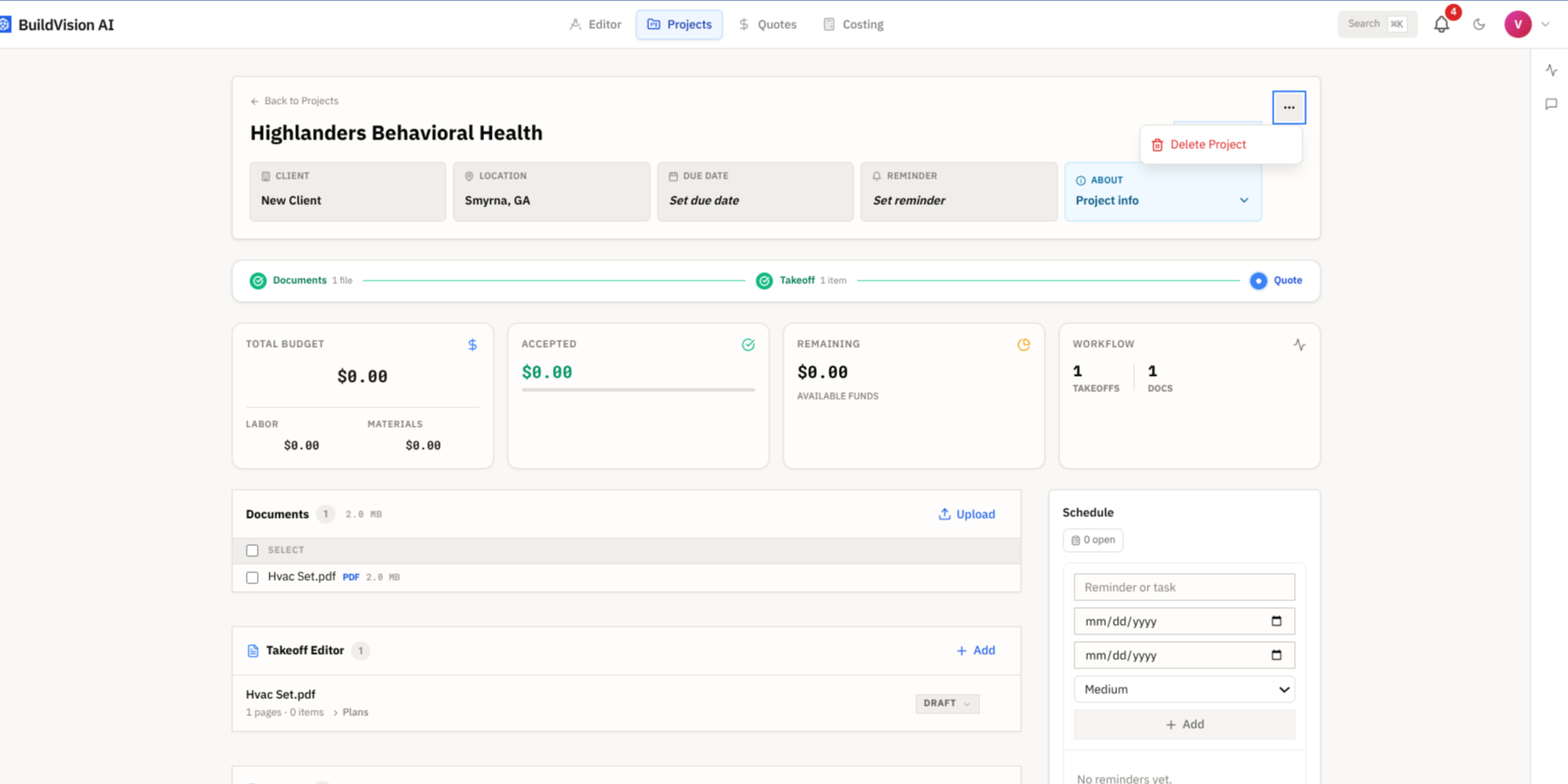
Deleting a project removes its documents, takeoffs, quotes, and activity history permanently. This cannot be undone. If you want to keep the record but stop active work, set the status to On Hold or Completed instead.
Customizing Your View
Collapse Sections
Click section headers to expand/collapse and focus on what matters.
Widget Arrangement
Drag widgets to rearrange the dashboard layout (saved per user).
Default Tab
Set which tab opens by default in your user preferences.
Mobile Access
The project dashboard works on mobile devices:
- Swipe between tabs
- Tap widgets to expand
- Quick actions in bottom bar
- Offline viewing for basic info
Next Steps
- Stages & Tasks - Break down the work
- Team Members - Assign your crew
- Change Orders - Track modifications